Summer Orienteering
A 3D path finding program to assist in planning for an orienteering adventure.
Lab for CSCI-331: Intro to AI
In the sport of orienteering, you are given a map with terrain information, including elevation, contours, and a set of locations to visit. Success requires a combination of athletic and planning skills - a smart competitor who can figure out the best way to traverse the terrain may beat a more athletic competitor who makes poor choices! In this lab, we created a path finding algorithm to assist in the planning process.

Image: Animated Terrain Example (Credit: Eric Dudley)
The Lab
The goal of this lab was to determine the quickest (not shortest) path following user-provided waypoints through different types of terrain. The user provides a 2D image of the terrain, an elevation file, and a waypoints file. Optionally, the user can modify the configuration of terrain speeds in program constants, allowing even more accuracy to be achieved during the planning process.
Specifically, the user provides the following:
- An image file containing a 2D image of the terrain, where the color of each pixel represents the terrain type (“open land”, “rough meadow”, “footpath”, etc.). Any number of terrain types can be configured, although the lab called for 10.
- A text file containing the Z or height component of each coordinate, separated by spaces (x separator) and newlines (y separator).
- A text file containing a list of coordinates that we must traverse through, in order (x y pairs)
- Optionally: A modification to the “speed map”, a dictionary containing all terrain types (colors) and the speeds that they are mapped to.
After running, the program outputs the total length of the quickest path in meters.
Implementation
Given the complexity of the problem space, I knew that choosing the correct data structures was crucial to a fast run time. Using a custom TerrainPoint class, manual hash functions, and a 2D dictionary, I was able to ensure O(1) access time for all data related to any coordinate after parsing the datafiles.
For the path finding algorithm, I used A* with a custom priority queue that I implemented using the Python heapq module. The priority queue holds instances of a PriorityNode class, which stores the estimated cost, actual cost, distanced traveled, and path for that node. Among other benefits, this prevents wasting time by backtracking once the target node is reached.
When calculating the time to travel between two coordinates, the speed at which you can traverse each point, indicated by the terrain type (pixel color), is taken into account. This allows users with varying athletic abilities to more accurately calculate the fastest path, provided their average speed throughout each type of terrain. I used meters per second for these values, allowing for real-world accuracy.
Results
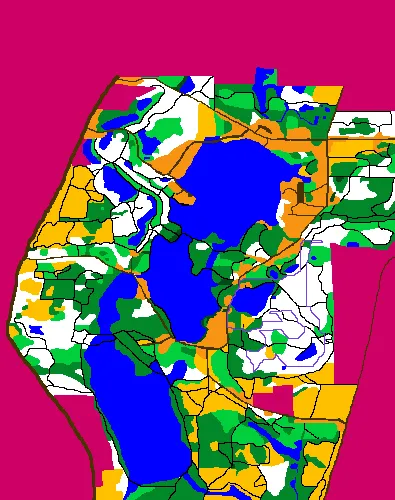
Image: Output of Full Test Case
The full test case used the 395x500 image above (197,500 coordinates) and the path contained 19 waypoints. The total distance traveled for the quickest path found using my chosen traversal speeds was 6746.7468m. The program’s runtime for this case was 0.29 seconds, including the time spent reading the input files and generating the output image. The purple path in the image represents the fastest path found by the algorithm, which is guaranteed to be the fastest path with the provided speeds.
My sourcecode for this lab is not publicly available due to issues with academic integrity, but I will happily provide it to you if you reach out (with good intentions, of course)! I love talking about my code, why I made the decisions I made, and what I could do better.
Future Improvements
If I were to continue working on this project outside the class’s specifications, the areas I’d focus most on are configurability and IO. The algorithms and data structures at the core of this application are efficient, simple, and scalable, and will require little modification to adapt to these types of changes.
Some ideas are:
- Configuring speeds without having to modify the sourcecode through use of a text file
- Reading terrain from 3D files (obj, xyz, stl) or traditional orienteering maps
- Track users throughout their journey and use time data to adjust speeds for predicting future paths
- Generate multiple paths based on other parameters (eg. specific difficulty)
- 3D Visualizer. View your terrain and the fastest path in 3 dimensions.